Auto Tapper for Windows 11 & Windows 10
Auto Tapper is an advanced desktop utility built to automate complex mouse actions, screen touch simulations, and swipe gestures on Windows computers. Perfect for mobile app testing, gaming macros, and workflow automation, this native app allows you to record exact click sequences, save macro scripts to local files, and map custom hotkeys seamlessly.
Automating touch sequences with this software does not require a touch-sensitive monitor or display. You can download a free trial of this lightweight utility to test its multi-point tapping capabilities completely offline with low CPU overhead.
Download Auto Tapper Free Trial
Explore our interface galleries to see the utility features in action, or download the Auto Tapper free trial for your PC. The installation package fully supports 64-bit operating systems with zero functionality limitations during the evaluation period.
Once your trial evaluation period ends, a software activation fees costs USD 7.89. This secures full functionality on one Windows PC for up to six months.
Automate Screen Tapping, Multi-Point Clicking, and Swiping Sequences
The software compiles custom screen macros into unified scripts, allowing you to seamlessly simulate mouse clicks, multi-point touch events, and complex drag-and-drop operations. All configured automation paths can be saved to local data files and reloaded instantly.
- Hotkey Control: Map customizable keyboard shortcuts to instantly insert coordinates or start and stop macro loops.
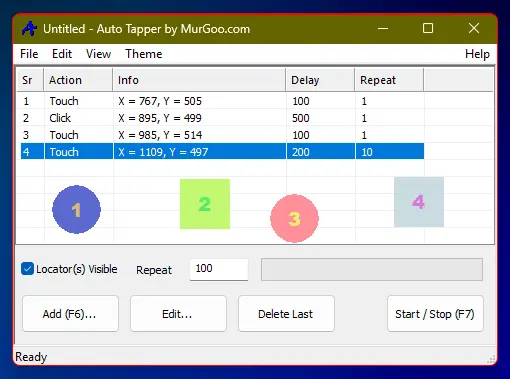
- Visual Target Locators: Drag intuitive overlay markers directly onto specific pixels to define execution coordinates without manual plotting.
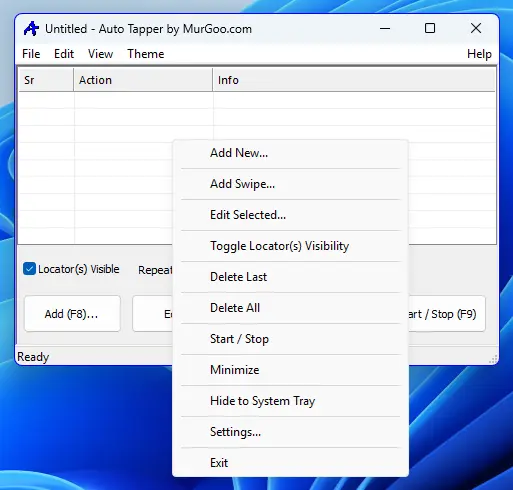
- Accessible Interface: Navigate the application using right-click context menus, standard keyboard tab controls, and fully draggable windows.
- Visual Themes: Customize user interface colors and dark/light modes to distinctively sort your saved automation scripts.
Packaged as a standard .msi installer, the setup file is digitally signed by Daanav Softwares, ensuring a verified, malware-free package that works reliably offline. The utility executes sequences with minimal CPU and RAM overhead. Please note that because it interfaces directly with native OS controls, certain security layers or applications utilizing Windows Hooks may flag automated clicker engines during background execution. Yes, free customer support is available from Support@MurGoo.com.
Auto Tapper Interface & Configuration Screenshots
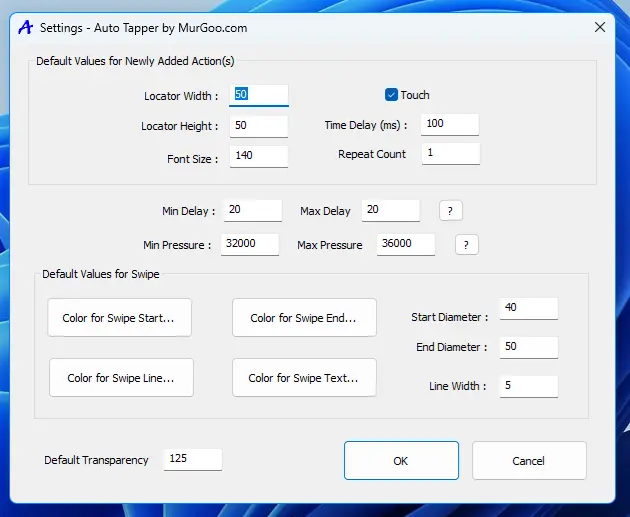
Review our detailed Auto Tapper screenshot gallery to understand the feature set before deployment. The configuration menu allows you to alternate smoothly between standard mouse clicks and simulated screen touch parameters.
Users can define the exact velocity of swipe or drag execution paths while keeping interface overlays highly visible. Toggle checkboxes on the dashboard let you hide or display screen target markers instantly; these locators automatically vanish whenever background macro routines launch.